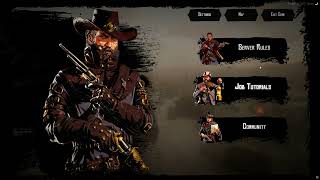
A fully custom, immersive pause menu that replaces the default Rockstar screen. Open it with ESC — your character pulls out a map, the world fades into a cinematic timecycle, and a hand-crafted book-style UI slides in. Three books, fully configurable content, no dependencies beyond your framework.
PREVIEW
Press ESC in-game — the native pause screen is blocked and replaced with this one. The player holds a map prop with an idle animation. The menu slides in with three book buttons on the right side: each book opens a content viewer with optional filter tabs on the left. Every label, every button, every page is yours to configure.
The menu won't open during death, in clothing stores, or while inventory is active
Features:
3 Books — Fully Configurable
- Each ”book” is a right-side button that opens a content reader
- Books are defined in
config.lua — add, remove, or rename them freely - Shipped with: Server Rules, Job Tutorials, Community — all placeholder content included, ready to overwrite.
Filter System (Tabs per Book)
- Each book can have one or multiple filters (tabs)
- Single filter → no tab bar shown, content loads directly
- Multiple filters → tab bar appears on the left side automatically
- Adding a new tab is one line in config:
{ label = 'My Page', content_file = 'content/mypage.html' }
Content Pages — Write Your Own
- Each page is a plain
.html file inside the content/ folder - Documented
_TEMPLATE.html included — you can create pages with zero HTML knowledge - Supported elements:
<p> paragraphs, <h2> headings, <ul>/<ol> lists<strong> bold, <div class="note"> highlighted warning/tip box<img> single image, <figure> for two images side by side with optional caption
- Colored text — wrap any word in
<span class="y/r/g/b/gr/w"> for yellow, red, green, blue, gray, or white - Images go in
content/content_images/ and are referenced simply as ../content_images/yourfile.png
Top Buttons
- Map, Settings, and Exit Game buttons — each toggleable individually via config
- Map button spawns the map prop and launches the native RDR2 map app seamlessly
- Settings button opens the native game settings
- Exit Game triggers a clean server kick with a configurable goodbye message
Framework Support
- RSG-Core and VORP — set
Config.Framework = 'rsg' or 'vorp', done - Safety eligibility checks per-framework (login state, inventory state, death state)
All Labels Configurable
- Every button label and book title is a single string in
Config.Labels
Installation: Plug & Play
Dependencies: RSG-Core / VORP
Use code summer1899 at checkout for 10% off all resources
Our resources are adaptable and can be tailored to your specifications!
This resource is OPEN !
-- ============================================================
--  lrc-pausemenu | config.lua
-- ============================================================

Config = {}

Config.Framework   = 'rsg' -- 'rsg' or 'vorp'
Config.QuitMessage = 'You have left the server.'
Config.Timecycle   = 'RespawnLight' -- timecycle modifier applied when menu opens. Set to '' to disable.

-- ══════════════════════════════════════════════════════════════
--  LABELS
--  Change the display text for all UI buttons and book titles.
-- ══════════════════════════════════════════════════════════════

Config.Labels = {
    -- Top buttons
    map      = 'Map',
    settings = 'Settings',
    exit     = 'Exit Game',
    -- Book buttons (right side)
    book1    = 'Server Rules',
    book2    = 'Job Tutorials',
    book3    = 'Community',
}

-- ══════════════════════════════════════════════════════════════
--  TOP BUTTONS
--  Toggle which top buttons are visible.
-- ══════════════════════════════════════════════════════════════

Config.TopButtons = {
    map      = true,
    settings = true,
    exit     = true,
}

-- ══════════════════════════════════════════════════════════════
--  BOOKS
--  Each book = one right-side button.
--  Each filter = one tab inside the book.
--
--  buttonAsset  — image file inside ui/assets/ (1b.png / 2b.png / 3b.png)
--  content_file — html file inside content/
--                 Images inside those pages go in content/content_images/
--                 and are referenced as
--
--  Single-filter books: no filter bar is shown, just the content.
--  Multi-filter books:  filter buttons appear on the left side.
-- ══════════════════════════════════════════════════════════════

Config.Books = {

    -- ── BOOK 1: Server Rules ──────────────────────────────────
    {
        label       = 'Server Rules',
        buttonAsset = 'assets/1b.png',
        filters = {
            -- Single filter = no filter bar shown
            { label = 'General',    content_file = 'content/rules_general.html' },
            -- Add more filters below to split rules into sections:
            -- { label = 'Roleplay',   content_file = 'content/rules_roleplay.html' },
            -- { label = 'Combat',     content_file = 'content/rules_combat.html' },
            -- { label = 'Economy',    content_file = 'content/rules_economy.html' },
        }
    },

    -- ── BOOK 2: Job Tutorials ─────────────────────────────────
    {
        label       = 'Job Tutorials',
        buttonAsset = 'assets/3b.png',
        filters = {
            { label = 'Coachman',    content_file = 'content/jobs_coachman.html' },
            { label = 'Constructor', content_file = 'content/jobs_constructor.html' },
            -- Add your own job pages here:
            -- { label = 'My Job', content_file = 'content/jobs_myjob.html' },
        }
    },

    -- ── BOOK 3: Community ─────────────────────────────────────
    {
        label       = 'Community',
        buttonAsset = 'assets/2b.png',
        filters = {
            { label = 'Offenses',   content_file = 'content/community_info.html' },
            -- Add more filters below:
            -- { label = 'Sanctions',  content_file = 'content/penal_sanctions.html' },
            -- { label = 'Appeals',    content_file = 'content/penal_appeals.html' },
        }
    },

}
![LRC - Pause-Menu [RSG-Core & VORP]](https://dunb17ur4ymx4.cloudfront.net/packages/images/4b7b9a81f4256ecbae92aa3a2f84eb14bd33e689.webp)
![LRC - Pause-Menu [RSG-Core & VORP] - Video](https://img.youtube.com/vi/tSE3bHIP_Ac/maxresdefault.jpg)