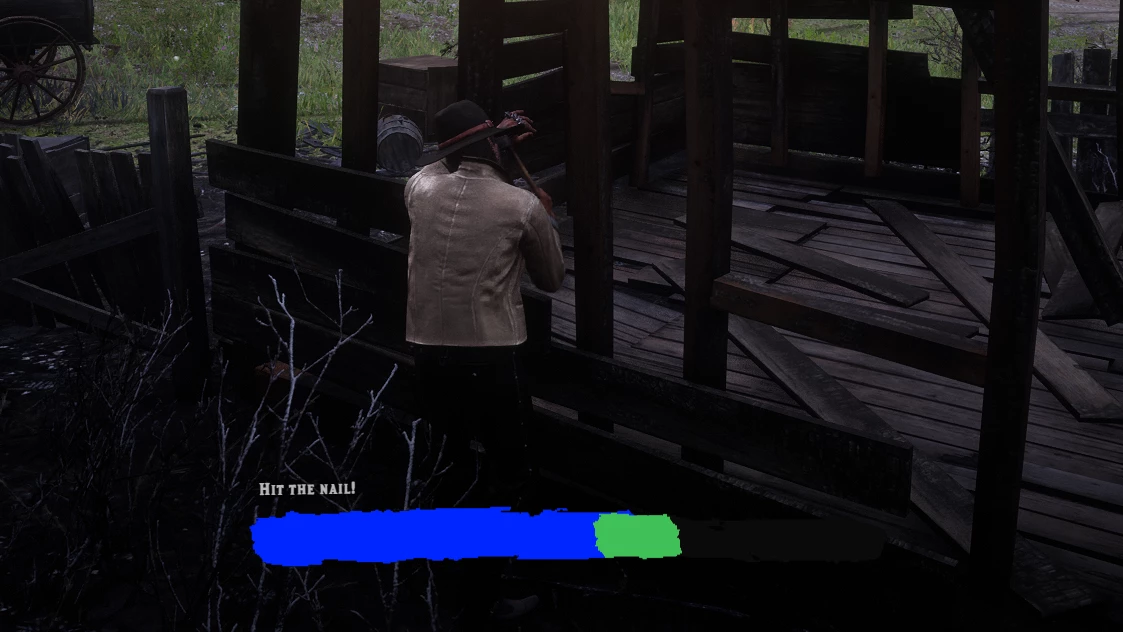
# lrc-progressbar-minigame
A standalone RedM progress bar resource you can use across your resources.
# lrc-pgbar — README
## What is this?
This resource gives you two things you can use in any of your RedM resources:
1. A **progress bar** — the player sees a bar filling up and has to wait
2. A **timing minigame** — the player has to press E at the right moment
---
## Setup
Drop `lrc-pgbar` in your resources folder and add it to your `server.cfg`:
```
ensure lrc-pgbar
```
Make sure it starts **before** any resource that uses it.
Then in the `fxmanifest.lua` of your resource, add:
```lua
dependencies { 'lrc-pgbar' }
```
---
## How to use the progress bar
The progress bar:
```lua
local done = exports['lrc-pgbar']:StartProgress(5000, "Applying bandage...")
if done then
-- this runs after the bar is full
-- give the player health, remove the item, whatever
end
```
The first number is how long it takes in **milliseconds**. 5000 = 5 seconds.
The text is what shows up on screen while the bar is filling.
---
## How to use the timing minigame
The timing minigame shows a bar with a small zone on it. The bar fills up and the player has to press **E** when the fill reaches the zone. If they miss, they fail and get ragdolled for a second.
```lua
local success = exports['lrc-pgbar']:StartTimingMinigame(2200, "Hit the nail!", 1, 20)
if success then
-- player hit the zone, reward them
else
-- player missed, punish them or whatever
end
```
The four values you pass in:
| Value | What it does |
|---|---|
| `2200` | How fast the bar fills (ms) — lower = faster = harder |
| `"Hit the nail!"` | Text shown on screen |
| `1` | How many times the player needs to hit the zone to succeed |
| `20` | How big the zone is (1–100) — smaller = harder |
So if you want it easier, raise the ms and raise the zone size.
If you want it harder, lower both.
---
## How to cancel the bar
If something happens and you need to stop the bar early (player died, got interrupted, etc.):
```lua
exports['lrc-pgbar']:cancelCurrentProgressBar()
```
## Quick example — bandage item
```lua
-- Player uses a bandage item
local success = exports['lrc-pgbar']:StartProgress(4000, "Applying bandage...")
if success then
-- heal the player
TriggerEvent('hospital:client:SetHealth', 200)
end
```
## Quick example — lockpick
```lua
-- Player tries to pick a lock, needs skill
local success = exports['lrc-pgbar']:StartTimingMinigame(1800, "Picking the lock...", 2, 15)
if success then
-- open the door or whatever
else
-- break the lockpick
end
https://github.com/user-attachments/assets/1de49c43-d9ea-4a75-a371-a20deb878029